













AI Fleet Management

Manage Your Fleet From the Same Board

Live Tracking | Maintenance | Fuel and Idle Time | Driver Safety | Vehicle Assignment | Fleet and Dispatch Together

How Voice AI works with fleet management

Manage the Fleet by Voice

Ask where a truck is, report a vehicle problem, or check upcoming maintenance without opening another app.

Find Any Vehicle

Ask where a truck is and get its current location.

Report Vehicle Issues

Speak the issue and create a maintenance ticket immediately.

Stay Ahead of Maintenance

Get reminders before scheduled service becomes a breakdown.

Spot Unusual Activity

Flag unusual idle time, movement, or route activity.

Connect Fleet and Dispatch

Find the closest vehicle from the same dispatch system.
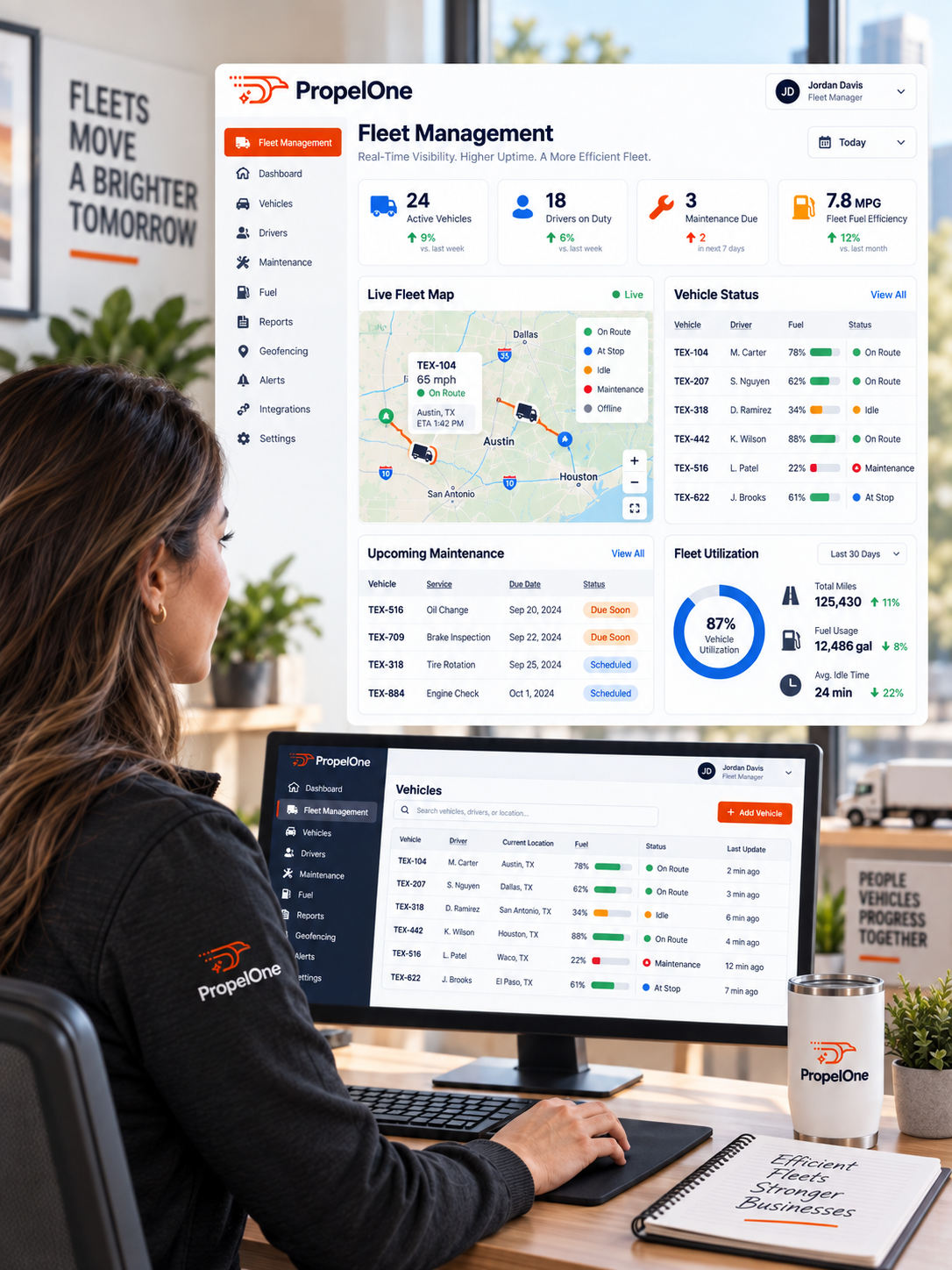
PropelOne Voice AI writing call details into the CRM customer record
Fleet Management Features

Run the Fleet Beside the Dispatch Board

Track location, maintenance, cost, safety, and vehicle use in one place.

Live GPS Tracking
Live GPS Tracking
See Every Vehicle in Real Time

View every truck beside the jobs it serves.
Key capabilities
  • Live location, speed, and direction
  • Fleet and dispatch on one screen
  • Location in on my way texts
  • Route history
Vehicle Maintenance Tracking
VEHICLE MAINTENANCE
Service Vehicles Before They Fail

Track upcoming work by mileage, time, and vehicle alerts.

Key capabilities
  • Mileage and time schedules
  • Advance reminders
  • Engine fault alerts
  • Complete service history
Fuel and Idle Monitoring
Find Hidden Fleet Costs

See where fuel and idle time are draining money.

Key capabilities
  • Fuel use by vehicle
  • Idle time tracking
  • Cost trends
  • Unusual activity alerts
Driver Safety and Behavior
DRIVER SAFETY
Coach From Real Driving Data

Use driving events and trends to improve safety.

Key capabilities
  • Braking, acceleration, and speeding events
  • Safety scores
  • Route replay
  • Driver trends
Vehicle Assignment and Utilization
Put Every Truck to Work

Connect vehicles to technicians and see how each asset is used.
Key capabilities
  • Vehicle assignment
  • Utilization reporting
  • Underused vehicle alerts
  • Fast reassignment
Geofencing and Alerts
Know When a Vehicle Moves Outside the Plan

Set zones and receive alerts for unexpected activity.

Key capabilities
  • Custom geofences
  • After hours alerts
  • Zone entry and exit notices
  • Vehicle alert history
ONE VEHICLE. ONE COMPLETE RECORD.

Every Mile, Tracked

Seven steps, most of them logged without anyone touching a button.

1
Start live tracking.

GPS tracking picks up location, and mileage keeps counting toward the next scheduled service.

2
Record every trip.

Location, speed, and idle time, without anyone entering a thing.

3
Capture vehicle issues.

A dashboard light or a strange noise, logged the moment it is mentioned, by voice or a quick note.

4
Trigger service reminders.

Mileage or time based, whichever comes first.

5
Connect the vehicle to dispatch.

Vehicle assignment and technician assignment in the same view.

6
Flag unusual activity.

After hours movement, a geofence crossed, an idle time spike.

7
Keep the full history.

Every trip, every service, every flagged issue, attached to that specific vehicle.

None of it required a separate fleet app or a spreadsheet somebody updates once a month.

Questions We Hear a Lot

You Ask. We Answer.

1. Does this require hardware installed in every vehicle?

Yes. Each tracked vehicle needs a GPS device.

2. Can customers see a technician’s live location in an on the way text?

Yes. Include live location in customer arrival updates.

3. Does it track fuel and idle time?

Yes. Track both by vehicle and date range.

4. Can it alert me if a vehicle leaves a designated area?

Yes. Set zones and receive movement alerts.

5. Does it track driver safety, like harsh braking?

Yes. Track driving events, routes, and safety scores.

6. Can a technician report a vehicle issue without filling out a form?

Yes. A voice report can create the maintenance ticket.
KEEP EVERY TRUCK READY

Fix It Before Failure

See where every vehicle is, what it costs, and what it needs next.